Your Personal AI Assistant; easy to install, deploy on your own machine or on the cloud; supports multiple chat apps with easily extensible capabilities.
QwenPaw














<a href="https://trendshift.io/repositories/25882" target="_blank"><img src="https://trendshift.io/api/badge/trendshift/repositories/25882/daily" alt="agentscope-ai%2FQwenPaw | Trendshift" style="width: 250px; height: 55px;" width="250" height="55"/></a>
[Documentation] [中文] [日本語] [Русский]
<p align="center"> <img src="https://gw.alicdn.com/imgextra/i1/O1CN01sens5C1TuwioeGexL_!!6000000002443-55-tps-771-132.svg" alt="QwenPaw Logo" width="120"> </p> <p align="center"><b>Works for you, grows with you.</b></p> </div>Your personal AI assistant — deploy locally or in the cloud, extend with Skills & Plugins, connect across every channel.
| Never forgets | Three-layer memory — live working context, full verbatim history, and a self-evolving personal knowledge base powered by ReMe. Conversations and resources continuously become readable, editable, searchable, and linked Markdown memory. |
| Local or cloud, runs free | QwenPaw-Flash models (2B / 4B / 9B) trained for agent tasks. Built-in QwenPaw Local runtime — no API key, no cloud dependency. Also works with Ollama, LM Studio, or 14+ cloud providers. |
| Security built in | Kernel-level Sandbox, Tool Guard, File Guard, Skill Scanner, and Access Policy. Dangerous commands are blocked before they run. |
| Multi-agent & parallel | Spawn independent agents with their own memory and skills. Sub-agents at runtime. Agent Communication Protocol (ACP) for cross-system orchestration. |
| File workspace | Unified file navigation, preview, editing, diffs, upload, and download across project and Agent files. |
| Extensible | Skills for scheduling, documents, browser, news, and more. Plugin architecture with a marketplace. MCP integration for external tools. Combine them into purpose-built workflows. |
| Reachable anywhere | DingTalk, Lark, WeChat, Discord, Telegram, iMessage, QQ — one instance, all channels. Console, TUI, and desktop app for direct access. |
| Yours, not ours | Deploy locally — data stays on your machine. No third-party hosting, no data upload. |
- Automation & scheduling: Set up recurring tasks — news digests, report generation, multi-channel broadcasting — all on your schedule.
- Code & development: Read, edit, review, and test code in your projects with the unified file workspace.
- Document processing: Read, write, and convert PDF, Word, Excel, and PowerPoint files.
- Information gathering: Search the web, follow subscriptions, summarize videos, and find what you need in your personal knowledge base.
- Multi-channel ops: Push alerts, summaries, or AI-generated content to DingTalk, Lark, Discord, Telegram, and more — simultaneously or per channel.
- Custom workflows: Combine built-in capabilities, plugins, and scheduled tasks into workflows tailored to your needs.
News
- [2026-07-24] v2.0.1 | PawApp mini-app platform, user-editable Agent Modes, Oh-My-Paw plugins, ReMe memory enhancements, desktop UX improvements, and more. v2.0.1 Release Notes →
- [2026-07-10] v2.0.0 — QwenPaw 2.0 Official Release 🎉 | An AgentScope 2.0 based ground-up rewrite delivering the Agent OS architecture, Loop Engineering, Scroll Context, ReMe v0.4 Self-evolving Personal Knowledge Base, and a bundled Terminal UI.
Built on Agent OS, we will be launching out-of-box QwenPaw applications — such as QwenPaw Creator and QwenPaw Insight — stay tuned. v2.0.0 Release Notes →Highlight What's new Agent OS — Workspace Three pillars per agent: Resources (transparent on disk), Governance (allow/deny/ask/sandbox), Sandbox (macOS / Linux / Windows). Agent OS — Drivers Protocol-neutral MCP / A2A / ACP connector layer with encrypted credentials and per-call policy gate. Loop Engineering Advanced agent loop templates (Coding Mode, Mission Mode, more to come) with composable approval gates. Scroll Context Every turn persisted; evicted turns indexed with on-demand recall — nothing summarized away. ReMe v0.4 Self-evolving Personal Knowledge Base Continuously turns conversations and resources into readable, editable, searchable, and linked Markdown memory. Terminal UI (TUI) Full-screen terminal chat — same agent, memory, and sessions as Console and channels. - [2026-06-17] v1.1.12 — Models Page Overhaul & Simple Mode | Redesigned Models page with provider aggregation; new Simple Mode for streamlined navigation. v1.1.12 Release Notes →
- [2026-06-11] AgentScope Platform is live — Free QwenPaw deployment, plugin sharing, and Skill marketplace. Try it now →
- [2026-06-10] v1.1.11 — Free Model OAuth, Plugin Market, MCP Tool Whitelisting. v1.1.11 Release Notes →
Table of Contents
- News
- Quick Start
- API Key
- Local Models
- Security Features
- Documentation
- FAQ
- Roadmap
- Contributing
- Install From Source
- Why QwenPaw?
- Built By
- License
Quick Start
Option 1: Pip Install
If you prefer managing Python yourself (requires Python >= 3.11, < 3.14):
pip install qwenpaw
qwenpaw init --defaults
qwenpaw app
Then open the Console in your browser at http://127.0.0.1:8088/ to configure your model. To chat in DingTalk, Lark, WeChat, etc., see the Channel setup documentation.

Option 2: Script Install
No Python setup required, one command installs everything. The script will automatically download uv (Python package manager), create a virtual environment, and install QwenPaw with all dependencies (including Node.js and frontend assets). Note: May not work in restricted network environments or corporate firewalls.
macOS / Linux:
curl -fsSL https://qwenpaw.agentscope.io/install.sh | bashWindows (CMD):
curl -fsSL https://qwenpaw.agentscope.io/install.bat -o install.bat && install.batWindows (PowerShell):
irm https://qwenpaw.agentscope.io/install.ps1 | iexNote: The installer will automatically check the status of uv. If it is not installed, it will attempt to download and configure it automatically. If the automatic installation fails, please follow the on-screen prompts or execute
python -m pip install -U uv, then rerun the installer.
⚠️ Special Notice for Windows Enterprise LTSC Users
If you are using Windows LTSC or an enterprise environment governed by strict security policies, PowerShell may run in Constrained Language Mode, potentially causing the following issue:
- If using CMD (.bat): Script executes successfully but fails to write to
PathThe script completes file installation. Due to Constrained Language Mode, it cannot automatically update environment variables. Manually configure as follows:
- Locate the installation directory:
- Check if
uvis available: Enteruv --versionin CMD. If a version number appears, only configure the QwenPaw path. If you receive the prompt'uv' is not recognized as an internal or external command, operable program or batch file,configure both paths.- uv path (choose one based on installation location; use if
uvfails): Typically%USERPROFILE%\.local\bin,%USERPROFILE%\AppData\Local\uv, or theScriptsfolder within your Python installation directory- QwenPaw path: Typically located at
%USERPROFILE%\.qwenpaw\bin.- Manually add to the system's Path environment variable:
- Press
Win + R, typesysdm.cpland press Enter to open System Properties.- Click “Advanced” -> “Environment Variables”.
- Under “System variables”, locate and select
Path, then click “Edit”.- Click “New”, enter both directory paths sequentially, then click OK to save.
- If using PowerShell (.ps1): Script execution interrupted
Due to Constrained Language Mode, the script may fail to automatically download
uv.
- Manually install uv: Refer to the GitHub Release to download
uv.exeand place it in%USERPROFILE%\.local\binor%USERPROFILE%\AppData\Local\uv; or ensure Python is installed and runpython -m pip install -U uv.- Configure
uvenvironment variables: Add theuvdirectory and%USERPROFILE%\.qwenpaw\binto your system'sPathvariable.- Re-run the installation: Open a new terminal and execute the installation script again to complete the
QwenPawinstallation.- Configure the
QwenPawenvironment variable: Add%USERPROFILE%\.qwenpaw\binto your system'sPathvariable.
Once installed, open a new terminal and run:
qwenpaw init --defaults   # or: qwenpaw init (interactive)
qwenpaw appmacOS / Linux:
# Install a specific version
curl -fsSL ... | bash -s -- --version 1.1.0

# Install from source (dev/testing)
curl -fsSL ... | bash -s -- --from-source

# Upgrade — just re-run the installer
curl -fsSL ... | bash

# Uninstall
qwenpaw uninstall          # keeps config and data
qwenpaw uninstall --purge  # removes everything
Windows (PowerShell):
# Install a specific version
irm ... | iex; .\install.ps1 -Version 1.1.12

# Install from source (dev/testing)
.\install.ps1 -FromSource

# Upgrade — just re-run the installer
irm ... | iex

# Uninstall
qwenpaw uninstall          # keeps config and data
qwenpaw uninstall --purge # removes everythingOption 3: Docker
Images are on Docker Hub (agentscope/qwenpaw). Image tags: latest (stable); pre (PyPI pre-release).
docker pull agentscope/qwenpaw:latest
docker run -p 127.0.0.1:8088:8088 \
  -v qwenpaw-data:/app/working \
  -v qwenpaw-secrets:/app/working.secret \
  -v qwenpaw-backups:/app/working.backups \
  agentscope/qwenpaw:latest
Also available on Alibaba Cloud Container Registry (ACR) for users in China: agentscope-registry.ap-southeast-1.cr.aliyuncs.com/agentscope/qwenpaw (same tags).
Then open http://127.0.0.1:8088/ for the Console. Config, memory, and skills are stored in the qwenpaw-data volume; model provider settings and API keys are in the qwenpaw-secrets volume; backup archives are stored in the qwenpaw-backups volume. To pass API keys (e.g. DASHSCOPE_API_KEY), add -e VAR=value or --env-file .env to docker run.
Connecting to Ollama or other services on the host machine
Inside a Docker container,
localhostrefers to the container itself, not your host machine. If you run Ollama (or other model services) on the host and want QwenPaw in Docker to reach them, use one of these approaches:Option A — Explicit host binding (all platforms):
docker run -p 127.0.0.1:8088:8088 \
  --add-host=host.docker.internal:host-gateway \
  -v qwenpaw-data:/app/working \
  -v qwenpaw-secrets:/app/working.secret \
  -v qwenpaw-backups:/app/working.backups \
  agentscope/qwenpaw:latest
Then in QwenPaw Settings → Models, change the Base URL to
http://host.docker.internal:<port>— for example,http://host.docker.internal:11434for Ollama, orhttp://host.docker.internal:1234/v1for LM Studio.Option B — Host networking (Linux only):
docker run --network=host \
  -v qwenpaw-data:/app/working \
  -v qwenpaw-secrets:/app/working.secret \
  -v qwenpaw-backups:/app/working.backups \
  agentscope/qwenpaw:latest
No port mapping (
-p) is needed; the container shares the host network directly. Note that all container ports are exposed on the host, which may cause conflicts if the port is already in use.
The image is built from scratch. To build the image yourself, please refer to the Build Docker image section in scripts/README.md, and then push to your registry.
Option 4: Deploy on Alibaba Cloud ECS
To run QwenPaw on Alibaba Cloud (ECS), use the one-click deployment: open the QwenPaw on Alibaba Cloud (ECS) deployment link and follow the prompts. For step-by-step instructions, see Alibaba Cloud Developer: Deploy your AI assistant in 3 minutes.
Option 5: AgentScope Platform
AgentScope Platform provides one-click cloud QwenPaw deployment, plugin sharing, and a Skill marketplace. Free, 7/24 online.
Option 6: Using ModelScope
ModelScope Studio also supports cloud QwenPaw deployment. Note: set your Studio to non-public so others cannot control your QwenPaw.
Option 7: Desktop Application (Beta)
Beta Notice: The desktop application is currently in Beta testing phase with the following known limitations:
- Incomplete compatibility testing: Not fully tested across all system versions and hardware configurations
- Potential performance issues: Startup time, memory usage, and other performance aspects may need further optimization
- Features under development: Some features may be unstable or missing
If you're not comfortable with command-line tools, you can download and use QwenPaw's desktop application without manually configuring Python environments or running commands.
Download
Download the desktop app (Tauri build) from the official download page:
- Windows:
QwenPaw-Tauri-<version>-Windows-setup.exe - macOS:
QwenPaw-Tauri-<version>-macOS.zip(Apple Silicon recommended)
Features
- ✅ Zero configuration: Download and double-click to run, no need to install Python or configure environment variables
- ✅ Cross-platform: Supports Windows 10+ and macOS 14+
- ✅ Visual interface: Automatically opens the app window, no need to manually enter addresses
- ⚠️ Beta stage: Features are continuously being improved, feedback welcome
First Launch
Important: The first launch may take 10-60 seconds (depending on your system configuration). The application needs to initialize the Python environment and load dependencies. Please wait patiently for the window to open automatically.
macOS: Bypass System Security Restrictions
When you download the QwenPaw macOS app from Releases, macOS may show: "Apple cannot verify that 'QwenPaw' contains no malicious software". This happens because the app is not notarized. You can still open it as follows:
- Right-click to open (recommended)
Right-click (or Control+click) the QwenPaw app → Open → in the dialog click Open again. This tells Gatekeeper you trust the app; after that you can double-click to launch as usual. - Allow in System Settings
If it is still blocked, go to System Settings → Privacy & Security, scroll to the message like "QwenPaw was blocked because it is from an unidentified developer", and click Open Anyway or Allow. - Remove quarantine attribute (not recommended for most users)
In Terminal run:xattr -cr "/Applications/QwenPaw Desktop.app"
(or use the path to the.appafter unzipping). This clears the "downloaded from the internet" quarantine flag so the warning usually does not appear, but is less safe and controllable than using Right-click → Open.
For detailed usage instructions, troubleshooting, and common issues, see the Desktop Application Guide.
What's Next?
After installation, configure your model in Console → Settings → Models, then explore:
- Add Skills to extend capabilities (PDF, Office, browser, news, etc.)
- Set up Channels for DingTalk, Lark, Discord, and more
- Configure Cron for scheduled tasks and automation
- See the full Quick Start guide for all options and verification steps
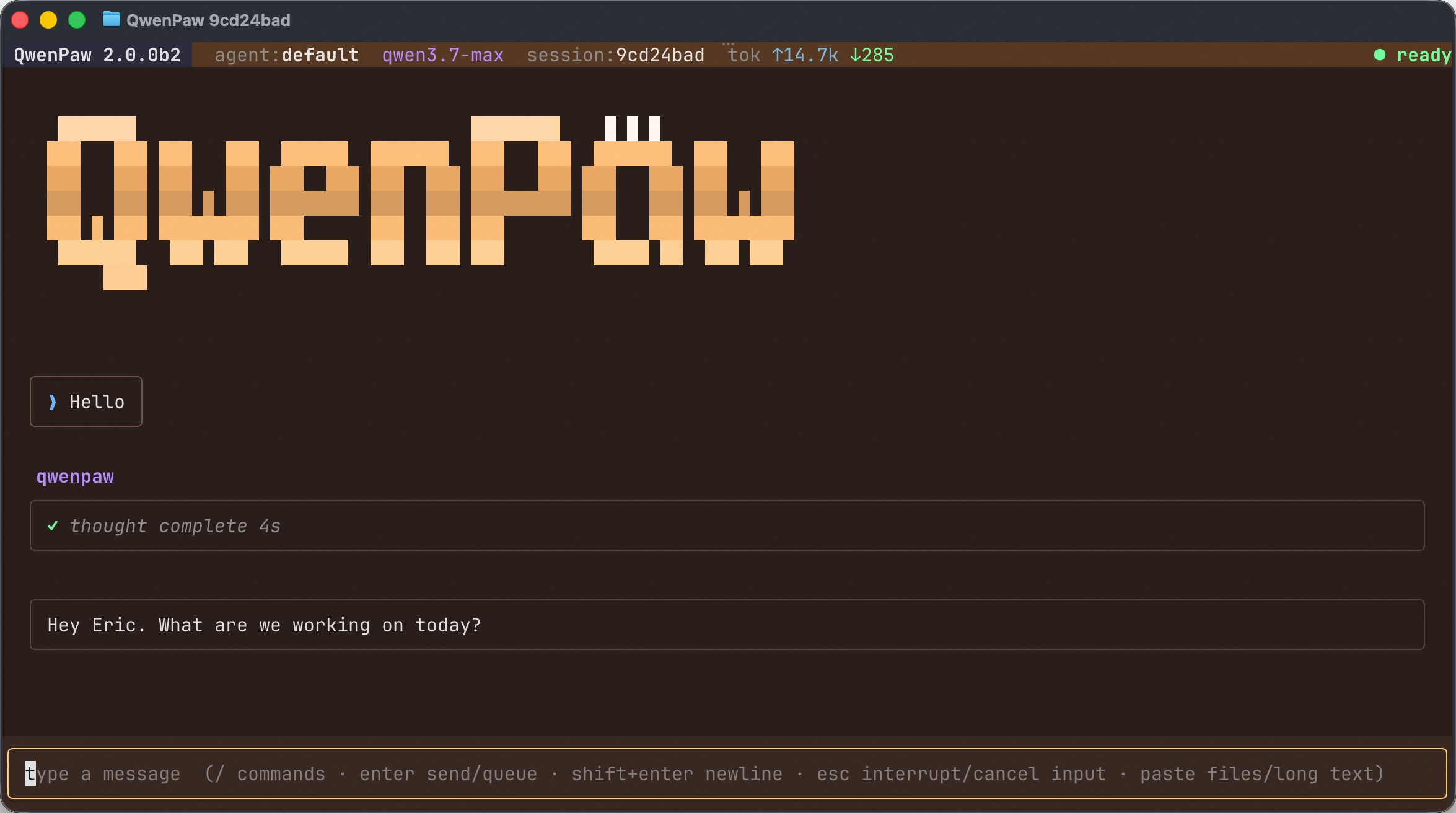
Terminal UI (TUI)
Prefer to stay in the terminal? Run qwenpaw to open a full-screen chat TUI that drives the same agent as the Console and the IM Channels — same memory, skills, MCP tools, and sessions — without leaving your keyboard.
qwenpaw                     # open a chat with the active agent
qwenpaw tui --resume <id>   # resume a previous session
qwenpaw .                   # start in the current repo (Coding Mode)
It supports streaming replies, slash commands (/help, /resume, /theme, plus the agent's own /model, /clear, …), pasting files/long text as attachments, and inline tool-permission prompts. See the Terminal UI guide for details.
API Key
If you use a cloud LLM API (e.g., DashScope / Qwen, OpenAI, Anthropic, Google Gemini, DeepSeek, Kimi, OpenRouter, and more), you must configure an API key before chatting. QwenPaw will not work until a valid key is set. See the official docs for details.
How to configure:
- Console (recommended) — After running
qwenpaw app, open http://127.0.0.1:8088/ → Settings → Models. Choose a provider, enter the API Key, and enable that provider and model. qwenpaw init— When you runqwenpaw init, it will guide you through configuring the LLM provider and API key. Follow the prompts to choose a provider and enter your key.- Environment variable — For DashScope you can set
DASHSCOPE_API_KEYin your shell or in a.envfile in the working directory.
Tools that need extra keys (e.g. TAVILY_API_KEY for web search) can be set in Console Settings → Environment variables, see Config for details.
Using local models only? If you use Local Models (QwenPaw Local / Ollama / LM Studio), you do not need any API key.
Local Models
QwenPaw can run LLMs entirely on your machine — no API keys or cloud services required. See the official docs for details.
QwenPaw also provides the QwenPaw-Flash series — purpose-trained 2B / 4B / 9B models for agent scenarios, with Q4 and Q8 quantizations. Available on ModelScope and Hugging Face.
| Backend | Best for | Install |
|---|---|---|
| QwenPaw Local (llama.cpp) | Cross-platform (macOS / Linux / Windows) | Built-in; click "Download" in the web UI. Supports QwenPaw-Flash with hardware-aware recommendations. |
| Ollama | Cross-platform (requires Ollama service) | Install and start Ollama; set context length ≥ 32k. |
| LM Studio | Cross-platform (requires LM Studio) | Install and start LM Studio; enable Local Server. |
Security Features
QwenPaw includes four core security layers:
- Sandbox — Kernel-level execution isolation using Seatbelt (macOS), Bubblewrap / Landlock (Linux), and AppContainer (Windows). Shell commands run inside a restricted filesystem view.
- Tool Guard — YAML rule engine with
ShellEvasionGuardianinspects every tool call before execution, detecting command injection, path traversal, reverse shells, and obfuscated attacks. Configurable approval levels: STRICT / SMART / AUTO / OFF. - File Guard — Independent of Tool Guard; blocks agent access to sensitive files and directories (default-protects
~/.qwenpaw.secret/,~/.ssh, etc.). - Skill Scanner — Pre-activation scanning with block / warn / off modes and whitelist support. Detects prompt injection, hardcoded secrets, data exfiltration, and more.
See Security for details.
Documentation
| Topic | Description |
|---|---|
| Introduction | What QwenPaw is and how to use it |
| Quick start | Install and run (local or ModelScope Studio) |
| Console | Web UI: chat and agent configuration |
| Terminal UI (TUI) | Full-screen terminal chat, same agent as Console |
| Desktop App | Desktop application installation and usage |
| Models | Configure cloud, local, and custom providers |
| Channels | DingTalk, Lark, QQ, Discord, iMessage, and more |
| Skills | Extend and customize capabilities |
| Plugins | Plugin system and Plugin Market |
| MCP | Manage MCP clients |
| Persona | Agent personality customization (SOUL / PROFILE) |
| Memory | Self-evolving personal knowledge base built on local, editable, searchable, and linked Markdown memory, powered by ReMe |
| ReMe Documentation | Official ReMe overview and documentation |
| Memory-Evolving & Proactive | Agent memory evolution and proactive interaction |
| Context | Scroll-based context management |
| Magic commands | Control conversation state without waiting for the AI |
| Heartbeat | Scheduled check-in and digest |
| Cron / Scheduled Tasks | Scheduled tasks and automation |
| Multi-Agent | Create multiple agents and enable collaboration |
| Security | Sandbox, tool guard, file guard, skill scanner, access policy |
| Backup & Restore | Data backup and recovery |
| Config & working dir | Working directory and config file |
| REST API | HTTP API for integration and automation |
| ACP Integration | Agent Communication Protocol integration |
| CLI | Init, cron jobs, skills, clean |
| Agent Team Practice | Multi-agent team deployment guide |
| FAQ | Common questions and troubleshooting |
Full documentation: qwenpaw.agentscope.io/docs
FAQ
For common questions, troubleshooting tips, and known issues, please visit the FAQ page.
Roadmap
| Area | Item | Status |
|---|---|---|
| Horizontal Expansion | More channels, models, skills, MCPs — community contributions welcome | Seeking Contributors |
| Existing Feature Extension | Display optimization, download hints, Windows path compatibility, etc. — community contributions welcome | Seeking Contributors |
| Models | Multi-model switching | In Progress |
| Browser-use | Support Chrome extension | In Progress |
| Long-term Memory | Personal knowledge base | In Progress |
| QwenPaw Application | QwenPaw Creator | In Progress |
| QwenPaw Insight | In Progress | |
| Multi-agent | Compatibility with existing agents (e.g. Claude Code) | Planned |
| Group chat | Planned | |
| Subagent visualization | Planned |
Status: In Progress — actively being worked on; Planned — queued or under design, also welcome contributions; Seeking Contributors — we strongly encourage community contributions.
Contributing
QwenPaw evolves through open collaboration, and we welcome all forms of contribution! Check the Roadmap above (especially items marked Seeking Contributors) to find areas that interest you, and read CONTRIBUTING to get started. We particularly welcome:
- Horizontal expansion — new channels, model providers, skills, MCPs.
- Existing feature extension & refinement — display and interaction improvements, download hints, Windows path compatibility, etc.
Join GitHub Discussions to discuss ideas or pick up tasks.
Install From Source
git clone https://github.com/agentscope-ai/QwenPaw.git
cd QwenPaw

# Build console frontend first (required for web UI)
cd console && npm ci && npm run build
cd ..

# Copy console build output to package directory
mkdir -p src/qwenpaw/console
cp -R console/dist/. src/qwenpaw/console/

# Install Python package
pip install -e .- Dev (tests, formatting):
pip install -e ".[dev,test,full]" - Then: Run
qwenpaw init --defaults, thenqwenpaw app.
Note for updates: When updating to a new major version after
git pull, please also rebuild the frontend, reinstall the package (pip install -e .), restartqwenpaw app, and clear your browser cache withCtrl+Shift+R(orCmd+Shift+Ron macOS).
Why QwenPaw?
QwenPaw stands for Qwen Personal Agent Workstation, and also embodies the wisdom of Qwen and the warmth of a Paw.
We hope it is not a cold tool, but an intelligent and warm "little paw" always ready to help—a most intuitive partner in your digital life.
Built By
AgentScope team · AgentScope · AgentScope Runtime · ReMe
Contact Us
Staying Ahead
<a href="https://github.com/agentscope-ai/QwenPaw"> <img src="https://img.alicdn.com/imgextra/i1/O1CN01V8HYv61By0HYcIDaq_!!6000000000013-1-tps-1698-954.gif" width="600" alt="Star QwenPaw" /> </a>Star QwenPaw on GitHub and be instantly notified of new releases.
Telemetry
QwenPaw collects anonymous usage data during qwenpaw init to help us understand our user base and prioritize improvements. Data is sent once per version — when you upgrade QwenPaw, telemetry is re-collected so we can track version adoption.
What we collect:
- QwenPaw version (e.g., 1.1.12)
- Install method (pip, Docker, or desktop app)
- OS and version (e.g., macOS 14.0, Ubuntu 22.04)
- Python version (e.g., 3.13)
- CPU architecture (e.g., x86_64, arm64)
- GPU availability (yes/no)
What we do NOT collect: No personal data, no files, no credentials, no IP addresses, no identifiable information.
When running qwenpaw init interactively, you will be asked whether to opt in. If you choose --defaults, telemetry is accepted automatically. The prompt appears once per version and never affects QwenPaw's functionality.
License
QwenPaw is released under the Apache License 2.0.
Contributors
All thanks to our contributors:
<a href="https://github.com/agentscope-ai/QwenPaw/graphs/contributors"> <img src="https://contrib.rocks/image?repo=agentscope-ai/QwenPaw" alt="Contributors" /> </a>Repository
agentscope-ai/QwenPaw
Created
February 24, 2026
Updated
August 10, 2026
Language
Python